

Lots of people ask me about scanning, especially lately since the HP drivers for Mac have been broken. I find the best way to scan on a mac is using the Apple Image Capture app. This tutorial will supplement the official Apple support tutorial which can be found here: Apple Image Capture Instructions Take a look at the important menu items in the graphic below: Select whether you wish to place several sheets in the document feature or one sheet on the glass (flatbed) If you are scanning from the document feeder, you may only scan the entire page. Select...
Details
Spear Phishing Emails
May 19, 2020 We have been seeing a lot of Spear-Phishing emails lately. This is when a scammer sends you an email impersonating a person or company you know. Some emails want you to click on a button or link and ask you to fill in personal financial information. Others want you to respond to them and send money, usually in the form of a gift card. Note: If you look closely at the email address, you might see that something is not right. What do you do when you get one of these emails – they usually sound URGENT?...
Details
Home Theater – COMING SOON
Home Theater is a new topic on this site. There will soon be lots of tips on streaming, dolby digital settings etc. Keep watching.
Details
Flip Flop Your Mouse
I recently started using a Mac. One of my favorite features is the way the mouse wheel scrolls. Normally, when you scroll down, the lower part of the screen moves up and becomes visible. With then new OS-X, when you scroll down, you move the screen down and visa versa. In order to make your Windows mouse wheel behave this way, do the following: Open the control panel and select MouseClick on the Hardware tab select your mouse.Click Properties.Go t the Details tab and select the Hardware ID property from the dropdown.Now run regedit.exeFind the Key HKEY_LOCAL_MACHINE\SYSTEM\CurrentControlSet\Enum\HIDUnder this Key find...
Details
The Missing Delete Key
On the mac keyboard there is a key labeled "delete". Actually, this key is a backspace key. For instance, if you select several cells in Excel and hit the "delete" key, only the current cell is deleted. To get the real delete key back, hold down the "fn" (function) key while pressing the "delete" key.
Details
Syncing Google Calendar with IOS devices
Our family uses Google calendars and we share them with each other. It’s a great way to keep coordinated. On the macs, Ipads and Iphones, we use the apple app for calendar. Previously, you had to use Google’s exchange server to sync with an ipad or iphone. Since Google sync is now included on the ipad/iphone, Google does not accept new devices on its exchange server. So when you use setup to add the Google account to your calendar, you won’t see the shared calendars, only your own. You need to open the browser on your device and go to...
Details
Using WIFI only for International Travel
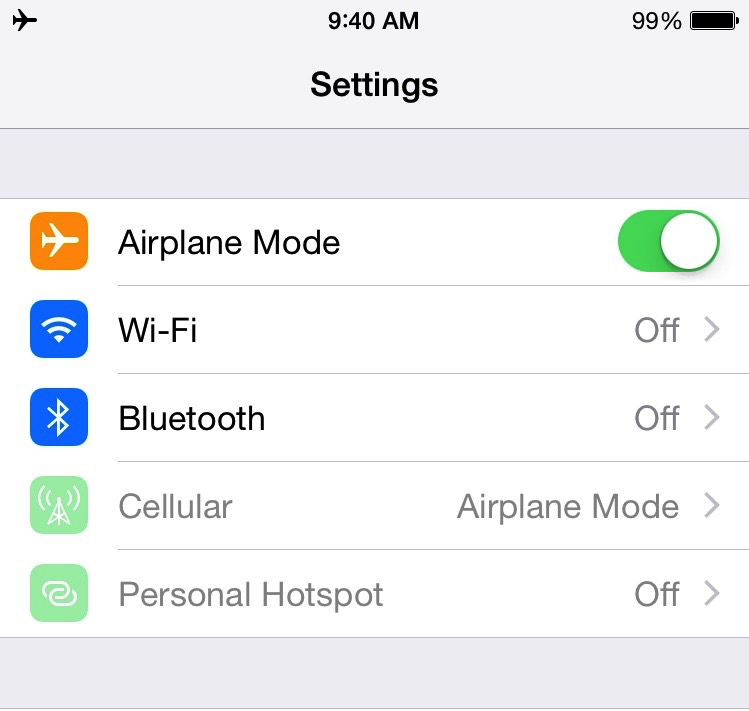
Are you cruising or travelling out of the country and plan only to use WIFI. On my recent trip, I found that despite the cost of WIFI on the ship ($30/day for 2 devices), it was worth it so that we could iMessage each other during the day. Initially, I simply turned cellular roaming and data off. I found that each day, my battery barely made it through. I was skimping on usage at the end of the day to make it last. It seems that my iPhone was working hard all day to find a non-roaming cellular signal. The right...
Details
Clean Up your Gmail Inbox
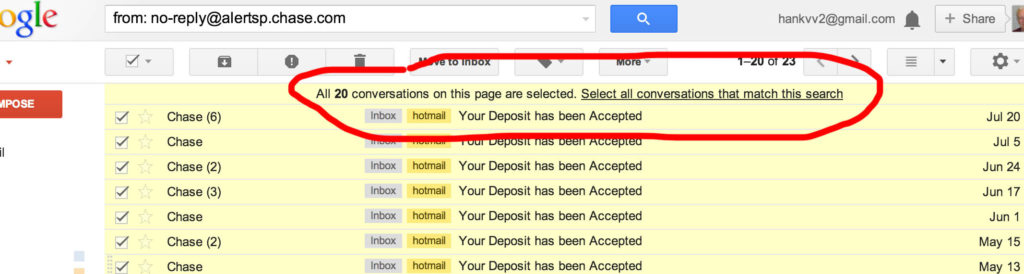
I was having lunch with friends the other day and they said that it was very cumbersome to cleanup their inboxes. Well here is a tip. Search for all the emails that you want to delete, such as Newsletters, Bank Confirmations, etc. On the first page, select all. A tiny menu comes up asking if you want to select all the emails in the search (see screen shot). If you select the link, all the emails are selected. Then you can simply delete them all at once. Note: one small glitch is that after deleting, you still see the emails...
Details
Password Advice
Keeping your logins to various websites secure is very important. The best way is to follow these rules: 1. Never use any word that is in the dictionary. 2. Never use a date, such as your birthday, address etc. 3. Always use 2 or more of the following: a) Capital Letter b) Lower Case Letter c) Number d) Symbol/Punctuation 4.Use a different password for each website A new thing with web sites is to ask you secret questions like "What was your first pet's name?". DO NOT GIVE OBVIOUS ANSWERS! Anyone can find...
Details
E-Mail Pet Peeves
There are a lot of things that are annoying in the email world. Here are some of the most violated rules. Never send an email without a subject. And make the subject descriptive enough to be found later. Not just: "hello", or "new idea".Don't use an email thread to talk about a completely different subject. Start a new email and copy only those who need to be included in the discussion. (Don't click on an old email and reply when starting a new subject.)Be thoughtful when using Respond or Respond All. Don't reply to all, "ok". Be sure to...
Details
Comcast Modem Port Blocking
I just got a new modem from Comcast. First of all it is HUGE. Secondly, it broke some of my apps. The new modem blocks most ports even if you turn it’s firewall off. You need to log into the modem to forward any ports your apps need to the Router so that it can pass them on to the computers on your network. The modem ip address is 10.0.0.1. Connect to it by entering that ip into your browser. The login id is admin and the password is password. I would recommend that you change the password. To disable...
Details